
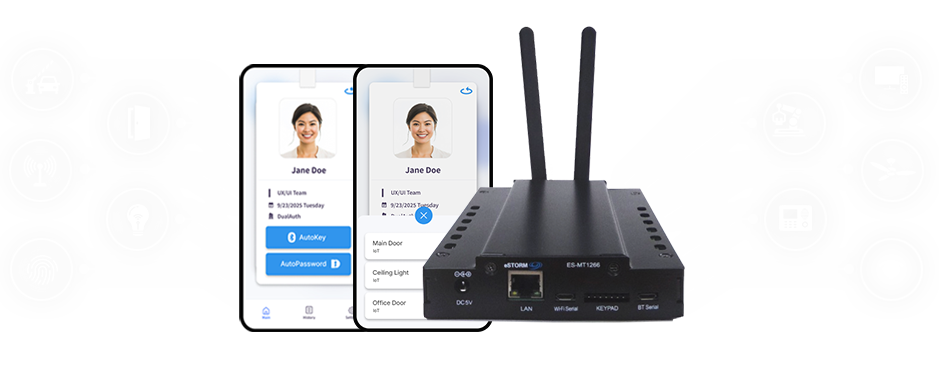
The AutoPassword IoT Controller is an IoT control device that allows users to operate various physical facilities—such as doors, lighting, and electrical appliances—using the mobile ID registered on their smartphone. Without replacing or modifying existing equipment, simply connecting the controller to a switch grants users with an AutoPassword ID Card the authority to control the device.
The device utilizes biometrics embedded in smartphones, making it a privacy-friendly technology that eliminates the need for physical facilities to store biometric information. It also integrates QR code, NFC, and Bluetooth authentication methods, which vary by smartphone manufacturer, into a single out-of-band authentication beacon, greatly improving user training and ease of use. This out-of-band physical facility access control technology based on authentication beacons has been established by ITU-T as the X.1268 international standard.
About AutoPassword IoT Controller
02
Key Points
Fortifying Exisiting Facilities
The AutoPassword IoT Controller connects to the existing facility control switches, allowing control via smartphone without modifying the current setup. It can be applied to any equipment operated by electrical signals.
Device Control Without Switch Exposure
Users can control the facility only when they are physically present in front of it using their smartphone. Because it uses a Bluetooth beacon with a one-time password that changes every 60 seconds, users can control the device only when they are physically in front of the facility.
Device Control Without Exposed Switches
Using a smartphone and authentication beacon, no separate recognition interface between the smartphone and the facility—like QR code or NFC—is required. The AutoPassword IoT Controller can be embedded in the ceiling or inside the facility where the equipment is located.
Easy User-Specific Permission Settings
When a facility administrator connects the AutoPassword IoT Controller to a facility and sets the authorized users in AutoPassword Access Manager, access permissions can be assigned on a per-user basis.
Key Distribution via Mobile
When an administrator registers a user in AutoPassword Access Manager, the user receives information via SMS or email to install and register the AutoPassword ID Card.
Prevent Facility Misuse Using Biometric Data
AutoPassword ID Card uses the smartphone’s built-in biometric data, so even if the device is stolen, it will not function unless the biometric information matches the ID holder.